

Features
Everything from the first call to the delivered report
Lumos is a complete building inspection software: offline field capture, assisted writing backed by a bank of 1,165 BNQ-qualified narratives, PDF and interactive reports, configurable templates and business management. Five pillars, one workspace.
The catalogue below walks every feature, stage by stage of the mandate, each row linked to its documentation page; every major stage also leads to its detailed pillar page.
The full catalogue
Every feature, in detail
The complete catalogue of Lumos features, grouped along the life of an inspection mandate, from the first contact to the paid invoice: every row links to the documentation page that covers it in depth.
87 features7 stages of the mandate100 % documented
From first contact to the visit
Taking on the mandate12
| Feature | What it does |
|---|---|
| Request widget for your website | A button installed on your own website opens an inspection request form that lands directly in Lumos. |
| Client invitation | Send your client a link so they fill out the inspection request form themselves, with your approval before the project enters your flow. |
| Contact book | An address book with seven contact types and a clear private versus shared distinction. |
| Project creation with MLS auto-fill | The creation form fills the property record from the MLS listing: address, listing broker, requested date, language. |
| Quote signed online | Your client approves the quote online in Lumos and a signed PDF is generated for the file. |
| Quote and agreement tracking | The status of the quote and of the service agreement shows in the project until signature. |
| BNQ, AIBQ and APCHQ agreements | The default BNQ service agreement, AIBQ and APCHQ templates for association members, and your own custom templates. |
| Agreement annexes | Divided co-ownership annex, certificate of completion and Standard of practice are added to the agreement at send time. |
| Quote and invoice emails with variables | Your quote and invoice email templates fill themselves with project data through {{ }} variables. |
| Calendar with five views and filters | Month, Week, 3 Days, Day and Agenda, with filters by status, project, client and inspection type. |
| Daily route | The full itinerary between your home base and your inspection stops, exportable to Google Maps, Apple Maps or Waze. |
| External calendar sync | An ICS subscription link syncs your inspections with Google Calendar, Apple Calendar, Outlook or Zoho. |
On site, even without signal
Field capture12
| Feature | What it does |
|---|---|
| Native iOS and Android appOffline | Lumos Capture downloads from the App Store and Google Play and extends the web app to the field. |
| Batch photos | Up to 12 photos per capture to document a component from several angles, grouped into one coherent capture. |
| Voice dictation | Dictate your observation on the spot; the audio note is processed in the background while you continue the visit. |
| Offline operationOffline | Offline-first: captures are stored locally on the device and synced invisibly as soon as the connection returns. |
| Finding review on mobile | The Review modal adjusts classification, title, content, deadline and photos, as a draft or straight into the report. |
| Inspections list | Your inspections organized by date, with statuses and a sync indicator. |
| Floating quick-capture button | In the web editor, a permanent button captures photo, audio or text without leaving the page you are on. |
| To review inbox | Field captures land in an inbox where you classify them into findings, assign them to a subsection and validate them. |
| Photo gallery | Every photo of an inspection in one place: sorting, filters and assignment to a section. |
| Photo annotation and editing | Annotate, crop, rotate: the toolbar turns a raw photo into a clear illustration in the report. |
| Images side panel | The gallery stays open on the right side so you can drag photos onto findings in two gestures. |
| Multi-device sync | Lumos Capture and Lumos Web sync automatically; you check at a glance that your data is up to date. |


From observations to findings
Writing and the narrative bank12
| Feature | What it does |
|---|---|
| Section-by-section editor | The nerve centre of Lumos: the report is built section by section, subsection by subsection. |
| BNQ-structured findings | Four ways to create a finding, always in the four-part BNQ 3009-500 structure: identification, role, consequences, recommendation. |
| Bank of 1,165 narratives | 710 pre-purchase and 455 pre-delivery narratives, BNQ-qualified and tied to their source, shared across all your inspections. |
| Two normative banks | Pre-purchase built on BNQ 3009-500; pre-delivery built on the National Building Code and the GCR Guarantee. |
| Four finding types | Information, Limitation, Deficiency and Method: the qualification that structures a BNQ-compliant report. |
| Attached sources | Default Lumos narratives, your company narratives and your private narratives live together in the same bank. |
| Semantic search and filtersAI | Filters by domain, type, source and inspection type, plus semantic search to find the right narrative among hundreds. |
| Bank inside the editor | The book icon opens the bank as an overlay, contextualized to the subsection you are working in. |
| Custom narratives | Add your own narratives to the bank, written by hand, with AI assistance or from an existing narrative. |
| Unlimited assisted writingAI | Rephrasings, richer descriptions and finding suggestions, with no usage cap and always under your control. |
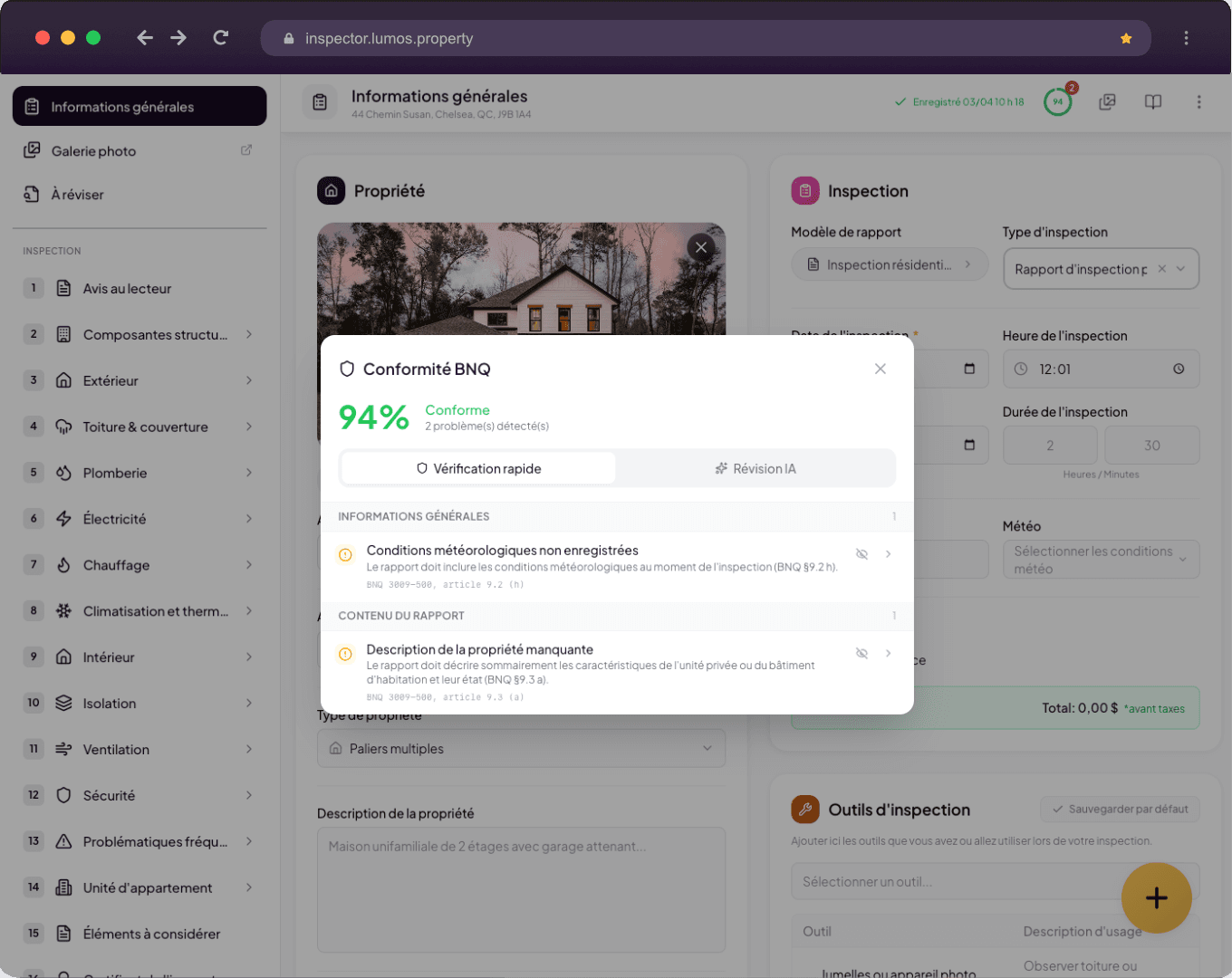
| Compliance reviewAI | The quick check verifies the completeness of the report; the AI review suggests rewrites aligned with BNQ terminology. |
| Real-time BNQ gauge (beta)Beta | A percentage indicator tracks how your report conforms to BNQ 3009-500 while you write. |
Your report, your structure
Report templates12
| Feature | What it does |
|---|---|
| System and personal templates | Use the provided BNQ template as is, duplicate it, or create your own in guided mode. |
| Template configuration | Name, standard and version of the template, table of contents, summary and section numbering. |
| Automatic FR-EN translationAI | You write in one language and auto-translation fills the other in the background as you type. |
| Sections and subsections | Create, rename, reorder and delete building sections, with icon, page-break and general-statement settings. |
| Clonable subsections | Each subsection carries its own behaviours: optional, clonable (bedroom 1, bedroom 2...) or hidden. |
| Six inspection element types | Text, number, date, lists and checkboxes, edited directly on the form itself. |
| Statuses and automatic findingsAuto | Inspected, Not inspected, Inaccessible, Absent: each status can hide the subsection or trigger an automatic finding. |
| Predefined findings per subsection | Choose which findings are offered by default in each subsection, reorder them and add from the bank. |
| Custom severity levels | Seven default levels, three display styles (icons, emoji, dots) and bilingual descriptions. |
| Narrative sections with variables | Notice to the reader, Conclusion and Inspector certificate: free-text pages with dynamic variables. |
| Assisted property descriptionAI | Customize the 15 lists of the assisted mode and your writing guidelines for the automatic enrichment. |
| Highlights (AI summary) | A summary of the most important findings, drafted by the AI and reviewed by the inspector. |
Deliver and reassure
Reports and delivery9
| Feature | What it does |
|---|---|
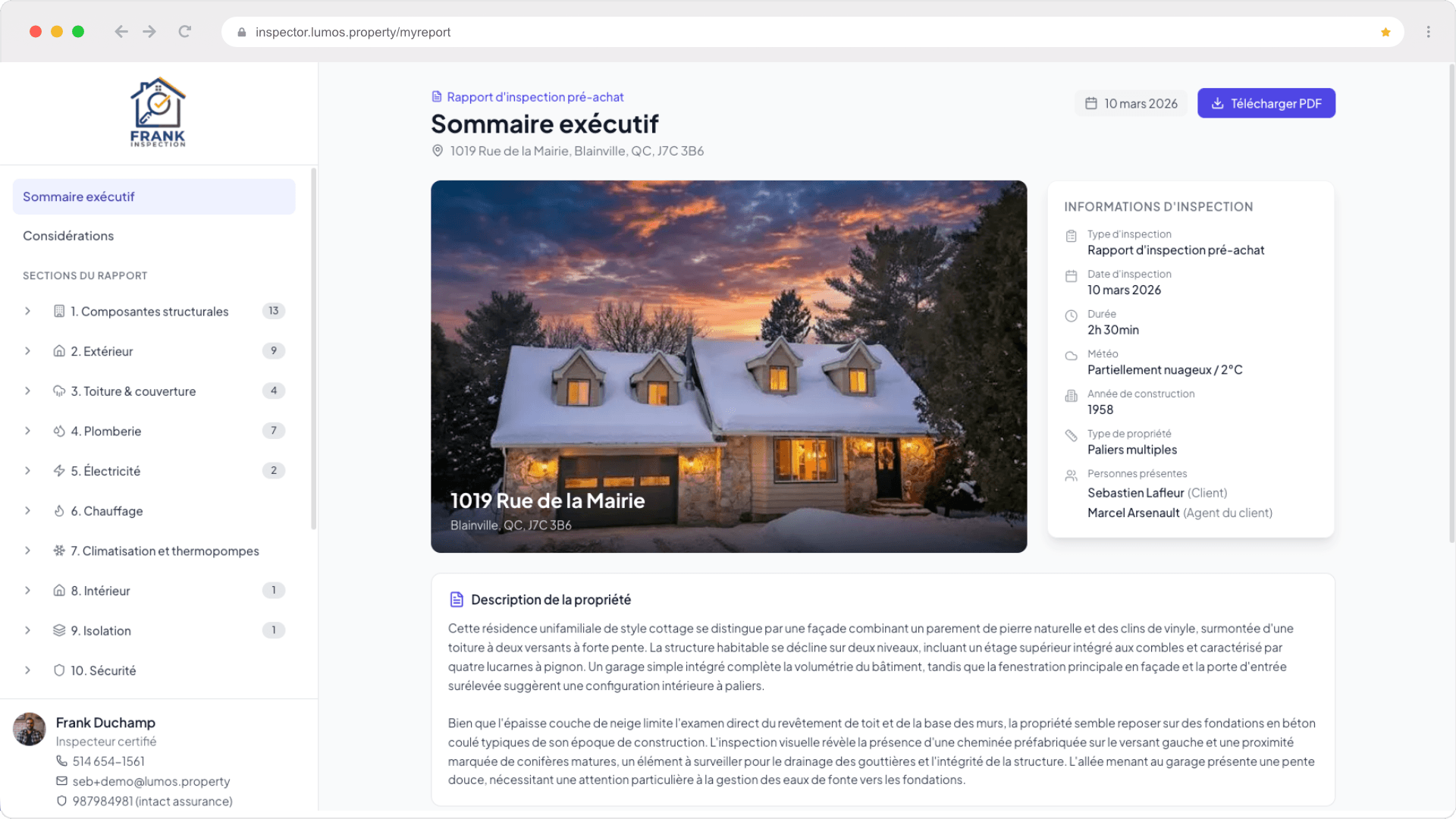
| Interactive web report | The main deliverable: executive summary, section navigation, considerations, conclusion and inspector card. |
| PDF built live | The PDF always reflects the current content of the report and downloads in one click from the interactive report. |
| Customizable report design | Finding display options, PDF design and the look of the interactive report are configured in your settings. |
| Delivery by link and access code | A permanent link and an access code, no account needed for the client, with multiple recipients and a choice of attached documents. |
| Polished client experience | Secure access page, your company branding and guided navigation from start to finish. |
| Consultation tracking | An email notifies you as soon as the client opens their report. |
| Bilingual reportFR·EN | All template content exists in French and English; you pick the report language at send time. |
| Document pages | Notice to the reader, Items to consider, Inspector certificate and Conclusion, pre-filled by the template and editable with variables. |
| Preview, audit and finalization | The header menu gathers previews, PDF settings, audit, finalization and archiving of the inspection. |
The business behind the inspection
Management and billing18
| Feature | What it does |
|---|---|
| Document Center | Every document of a project in one place, by inspection or by status, with counters, history and the next step to take. |
| Client portal | One page per client where they sign, upload, open their report and write to you — with no account to create. |
| Secure client link | A magic link valid 90 days, refreshed on every send and revocable at any time; it travels with every email. |
| Online signature of the documents | Quote, association agreement and BNQ prerequisites signed in the portal — one or two signatories, sealed copy and signature certificate. |
| Document requests and remindersAuto | Ask the client for the documents you need with a due date; reminders go out on their own and refusals come with a reason. |
| Project activity feed | A timestamped timeline of the project: sends, opens, signatures, uploads, refusals and client messages. |
| Final invoice in one click | The signed quote becomes the final invoice, sent by email and kept in the project. |
| Invoices with GST and QST | Numbering, line items, taxes computed from your address, branding, default notes and payment instructions. |
| Managing issued invoices | View, mark as paid, edit, resend or delete, with the matching statuses. |
| FR and EN email templates | Quote and invoice email templates in both languages, default notes and payment instructions. |
| Google review requestsAuto | Enable the review section, set up automatic sending and send review requests to your clients. |
| Dashboard | Activity statistics, recent projects, quick actions and recent activity on a single screen. |
| Projects page | The control centre to find, organize, archive and back up your entire activity. |
| Project lifecycle | Reversible archiving, restoration from the archives and permanent deletion. |
| Backup and restore (.zip) | Export a backup of your projects, filtered by period or selection, and restore it into Lumos when needed. |
| Team work | A master account and inspector sub-accounts, with a clear view of who sees what. |
| Roles and permissions | Two deliberately simple roles, Owner and Inspector, with clearly bounded rights. |
| Team content sharing | Projects, templates, narratives, images and contract templates are shared with per-type visibilities. |
Your settings, your data
Account and privacy12
| Feature | What it does |
|---|---|
| Profile and electronic signature | Your personal profile, your company information, your electronic signature and your calendar settings. |
| Setting up before the first mandate | The recommended order to configure your account before your first inspection. |
| Variables in text editors | The complete catalogue of variables usable in your contract, email and message templates. |
| Interface in French or English | The language choice applies immediately to the entire application. |
| Email notifications | Activity on your reports, marketing emails and transactional emails. |
| Account security | Change your login email, change your password or permanently delete your account. |
| Plans and free trial | Starter with 3 free inspections and single purchases, Pro monthly or yearly, Enterprise on request. |
| Free student plan | Free access during your building inspection studies, and up to 2 months after the end of your program. |
| Subscription management | The billing portal for your invoices and payment methods, cancellation and automatic renewal. |
| Privacy and Law 25 | Your Law 25 rights, the ownership of your data and access to the legal documents. |
| Audio capture consent | Enable or disable audio capture and inform the people present during an inspection. |
| AI and your data | Which AI models Lumos uses, where they are hosted, and the commitment to never train models on your data. |
Where to next
The platform
Ready to modernize your inspections?
Join hundreds of inspectors already using Lumos to deliver faster, better reports.